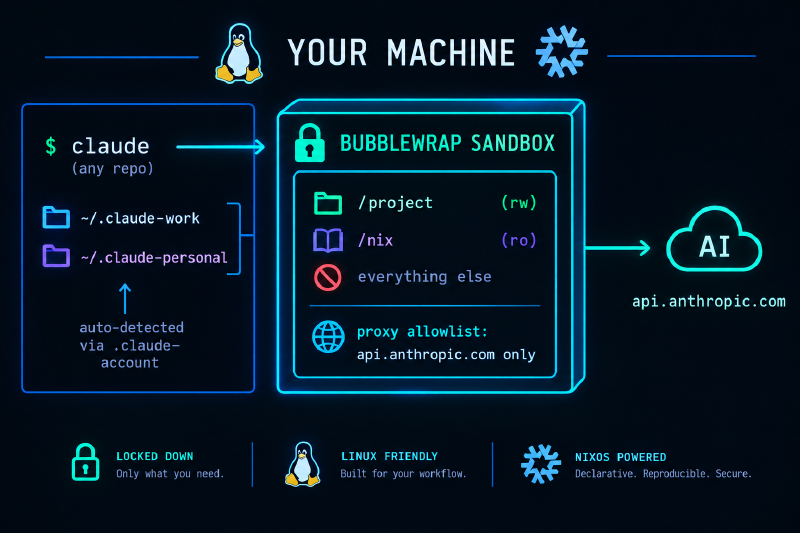
I run Claude Code from every repo on my machine, securely sandboxed, automatically. One concern I’ve always had with AI coding assistants is blast radius. Claude Code is incredibly capable — but giving it unrestricted access to my entire filesystem felt wrong. So I wired it up properly on NixOS.
Now I just type claude in any project directory and it automatically:
- Spins up a bubblewrap sandbox with an isolated filesystem and process namespace
- Mounts only that repo as the read/write workspace
- Restricts outbound traffic to
api.anthropic.comonly - Detects work vs. personal repos and switches Claude accounts automatically
- Declared in NixOS config — reproducible across every machine
Claude can see your project. Nothing else.
The Foundation: bubblewrap-claude
The heavy lifting is done by bubblewrap-claude, a NixOS flake that wraps Claude Code in a bubblewrap sandbox. Bubblewrap is the same technology that sandboxes Flatpak apps. It creates unprivileged containers using Linux namespaces — no root required.
The flake input in my flake.nix:
bubblewrap-claude.url = "github:matgawin/bubblewrap-claude";
Building the Sandbox Profile
In hosts/gsparks-sitespect/configuration.nix, I define a custom sandbox profile on top of bubblewrap-claude’s base:
let
  bwLib = inputs.bubblewrap-claude.lib.${pkgs.system};

  customProfile = bwLib.deriveProfile bwLib.base {
    name = "claude-sandbox";
    packages = [];
    allowList = [
      "api.anthropic.com"
      "platform.claude.com"
      "claude.ai"
      "gitlab.sitespect.com"
    ];
    args = [ "--ro-bind /nix /nix" ];
  };

  claude-sandbox = bwLib.mkSandbox customProfile;
The allowList is an outbound network allowlist — Claude can only reach the Anthropic API and my work GitLab instance. Everything else is blocked. The --ro-bind /nix /nix gives the sandbox read-only access to the Nix store, which is how the Claude Code binary and its dependencies get inside without being copied.
The Account Switcher
This is where it gets interesting. I use Claude Code on personal projects and on work projects. Those are separate Claude accounts with separate conversation histories and settings. I don’t want them bleeding into each other, and I don’t want to manually switch every time I change repos.
The solution is a shell wrapper that walks up the directory tree looking for a .claude-account file:
claude = pkgs.writeShellScriptBin "claude" ''
  ACCOUNT="personal"
  DIR="$PWD"
  while [ "$DIR" != "/" ]; do
    if [ -f "$DIR/.claude-account" ]; then
      ACCOUNT=$(cat "$DIR/.claude-account")
      break
    fi
    DIR=$(dirname "$DIR")
  done

  ACTIVE="$HOME/.claude"
  ACTIVE_JSON="$HOME/.claude.json"
  ACCOUNT_DIR="$HOME/.claude-$ACCOUNT"
  ACCOUNT_JSON="$HOME/.claude-$ACCOUNT.json"
  LAST_ACCOUNT_FILE="$HOME/.claude-last-account"
  LAST_ACCOUNT=$(cat "$LAST_ACCOUNT_FILE" 2>/dev/null || echo "")

  mkdir -p "$ACCOUNT_DIR"
  mkdir -p "$ACTIVE"
  touch "$ACTIVE_JSON"

  if [ -n "$LAST_ACCOUNT" ] && [ "$LAST_ACCOUNT" != "$ACCOUNT" ]; then
    ${pkgs.rsync}/bin/rsync -a --delete "$ACTIVE/" "$HOME/.claude-$LAST_ACCOUNT/"
    cp -f "$ACTIVE_JSON" "$HOME/.claude-$LAST_ACCOUNT.json"
    ${pkgs.rsync}/bin/rsync -a --delete "$ACCOUNT_DIR/" "$ACTIVE/"
    if [ -f "$ACCOUNT_JSON" ]; then
      cp -f "$ACCOUNT_JSON" "$ACTIVE_JSON"
    fi
  fi

  echo "$ACCOUNT" > "$LAST_ACCOUNT_FILE"

  exec ${claude-sandbox}/bin/claude-sandbox "$@"
'';
How it works:
- Walk up from
$PWDuntil a.claude-accountfile is found (or hit/and default topersonal) - If the account changed since last run,
rsyncthe active~/.claudestate into the previous account’s directory, thenrsyncthe new account’s state into~/.claude - Launch the sandboxed Claude
Each account’s state lives in ~/.claude-<account> and ~/.claude-<account>.json. Switching is instant and automatic.
To mark a repo (or a whole directory of work repos) as belonging to an account, just drop a one-line file in the root:
echo "work" > ~/work/.claude-account
Any subdirectory of ~/work will now automatically use the work account. Personal repos don’t need a file at all — personal is the default.
Wiring It Into NixOS
The claude wrapper replaces the upstream Claude Code package entirely:
environment.systemPackages = [ claude ];
That’s it. nixos-rebuild switch and claude becomes available system-wide, sandboxed, with account switching built in. No manual install steps. Any machine that imports this configuration gets the same setup.
What Claude Can and Can’t See
Inside the sandbox:
- Read/write: the current project directory (wherever you invoked
claude) - Read-only: the Nix store (
/nix) — needed for Claude Code’s own dependencies - Network:
api.anthropic.com,platform.claude.com,claude.ai, my work GitLab - Everything else: not mounted, not accessible
Claude can’t read other projects, can’t touch your home directory, can’t reach arbitrary network hosts. The blast radius of a worst-case prompt injection or a confused model is limited to the repo you’re already working in.
Why This Matters
I’m not especially paranoid. Claude Code hasn’t done anything to make me distrust it. But the security model of “this AI agent can read and write your entire filesystem” is one I’d rather not accept when there’s a clean alternative.
Bubblewrap + NixOS makes this easy to set up and impossible to forget — there’s no manual step that gets skipped on a fresh install. The sandbox is part of the system configuration. It’s just how claude works.
The bubblewrap-claude project is worth checking out if you’re on NixOS and want AI tooling that doesn’t make you nervous.